For families
Peace of mind at home. Get to know the person, talk it through, and choose for yourself.
Find care professionals for your kids, an older adult in your family, your pet, or home cleaning. In the app you search by category and area, get to know each professional's profile, and work out the details over chat.
Check availability in your area in the app, or write to us.

Who do you need care for?
Categories
Four kinds of care, explained plainly
Pick who it's for, and we'll tell you when it's used, what it isn't, and your first step in the app.
Child care

So your kids have company and attention during the hours you can't be there.
- When it's used
- When you're at work, have plans, or need a few hours for yourself.
- What it isn't
- A medical or emergency service. In an emergency, call 9-1-1.
- Name in the app
- Child Care
Your first step
- Get the app and tap “I Need A Caregiver”.
- Search for “Child Care” and compare profiles in your area.
- Before the first visit, chat about:
- Your kids' routines: schedules, meals and rest
- What they like to do, and your house rules
- Who to contact if plans change
Older adults

So someone in your family has company and help with daily activities.
- When it's used
- When they need company or help with their daily routine and you can't be there all the time.
- What it isn't
- A medical service. It's companionship and help with daily activities.
- Name in the app
- Elderly Care
Your first step
- Get the app and tap “I Need A Caregiver”.
- Search for “Elderly Care” and compare profiles in your area.
- Before the first visit, chat about:
- Their routine and the activities they enjoy
- Which daily activities they need help with
- How they like to be addressed, and who in the family to coordinate with
Pet care

So your pet gets attention and company while you're away.
- When it's used
- When you're out of the house for long stretches, or there just isn't enough time.
- What it isn't
- Veterinary care. If your pet needs medical attention, check with your vet.
- Name in the app
- Pet Care
Your first step
- Get the app and tap “I Need A Caregiver”.
- Search for “Pet Care” and compare profiles in your area.
- Before the first visit, chat about:
- Feeding and walk times
- How they get along with people and other animals
- What to do, and who to tell, if something changes
Home cleaning

For help keeping your home clean and in order.
- When it's used
- When there aren't enough hours in the day and you want to keep your home in order.
- What it isn't
- Maintenance or repairs. You agree on what the cleaning includes with the professional.
- Name in the app
- Clean Care
Your first step
- Get the app and tap “I Need A Caregiver”.
- Search for “Clean Care” and compare profiles in your area.
- Before the first visit, chat about:
- Which rooms and tasks come first
- Products you prefer, or ones to avoid
- The schedule, and how they'll get into the house
Need more than one kind of care, or not sure where to start? Tell us what you need
How it works
From getting to know someone to rating the service
Five moments, and what the app does in each one. We only tell you about what's already available.
Availablemarks what the app already does today.
-
Get to know the professional
Take your time with their profile, so you get to know the person before you decide.
In the app
- Profiles with experience, an intro video and reviewsAvailable
-
Choose
Search by category (for example, “Child Care”) and by area, compare profiles and choose.
In the app
- Search and choose care professionalsAvailable
-
Coordinate
Book and coordinate the service in the app, chat with the professional, and pay by card.
In the app
- Booking and coordinating the serviceAvailable
- Chat with the care professionalAvailable
- Card payments in the appAvailable
-
Receive the service
The service takes place at the time you set with the professional. If anything changes, you can stay in touch over chat. In an emergency, call 9-1-1.
In the app
- Chat with the care professionalAvailable
Off the screen
This part doesn't happen in the app: it's the professional with your family, your pet or your home.
-
Rate it
After the service, you can leave a rating and a review. And if it went well, you can book the same person again.
In the app
- Ratings and reviewsAvailable
Step 1 of 5
IllustrationIllustrations based on the app; the real screens are in English.
Get the Serena app

Trust
What we ask professionals for and what it means
What we ask care professionals for when they join, what that means, and what it doesn't. No promises nobody can keep.
- Issued by Costa Rica's Judiciary.
- Requested by the person themselves.
- Shows only what the law defines.
To join, professionals provide
- An ID
- A criminal record certificate from Costa Rica's Judiciarylocally called the “hoja de delincuencia”
- A résumé
- When
- As part of joining Serena as a care professional.
- What the certificate means
- Costa Rica's Judiciary issues it at the person's own request. For job purposes, the law limits it to certain current convictions: it's useful information, not someone's full history.
- What you see
- On each profile: experience, an intro video and reviews.
- What we recommend
- Chat with the professional before the first visit and rate the service afterward: your review helps other families choose.
What no check can do
No check removes every risk, so we recommend talking with the professional before the first visit.
Serena is not an emergency service. In an emergency, call 9-1-1.
Something didn't go the way you expected? Tell us, and we'll get back to you as soon as we can, through the channel you choose.
Tell us what happenedBefore you start
Area, schedules and language
A few straight answers before you download the app.
Your area
Availability depends on your area and the type of care, and you can check it in the app.
Schedules
Each professional lists in the app the services they offer and when they're available. You set the schedule with them in the app.
Language
The app's screens are currently in English. The illustrations on this page simplify them to explain how it works.
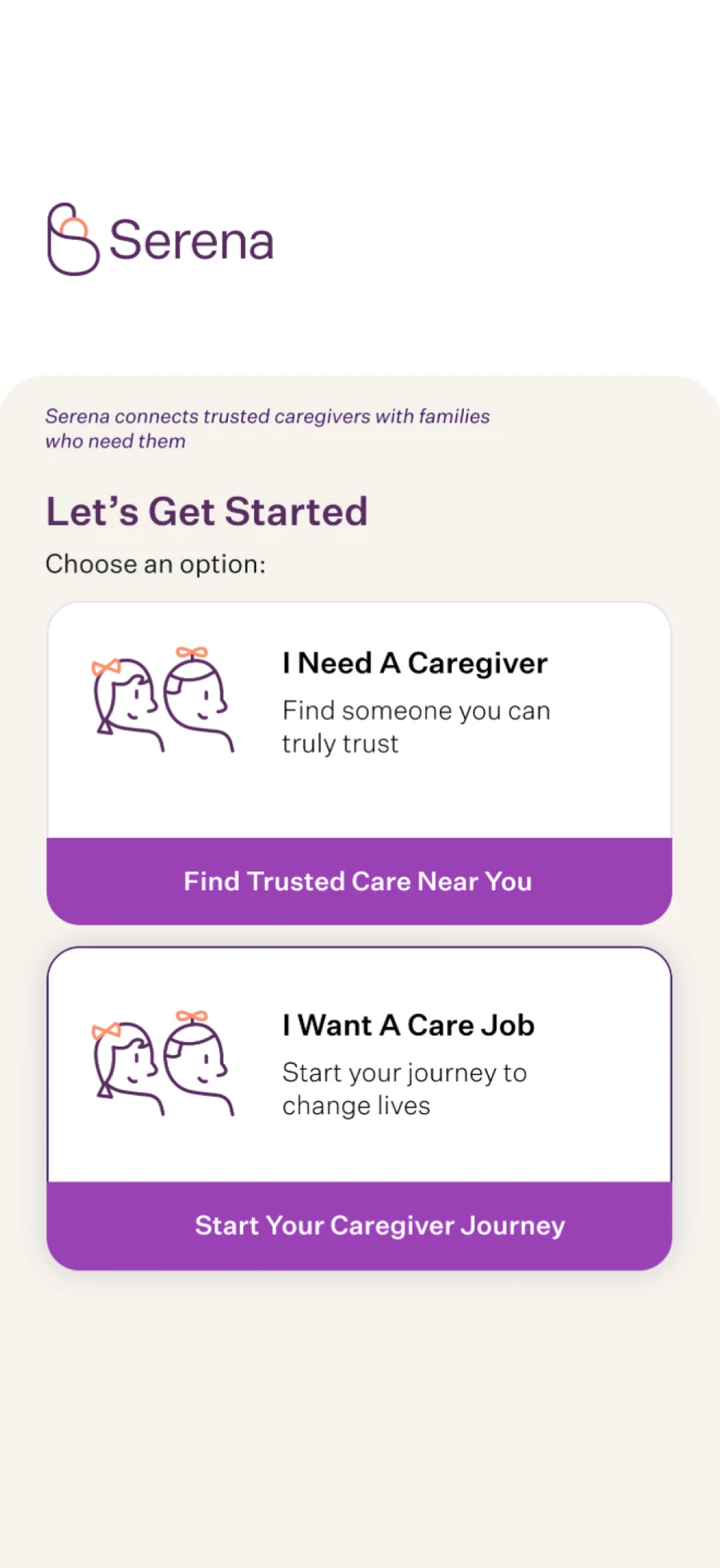
This is the app's first screen today: to look for care, tap “I Need A Caregiver”.
Can't find someone in your area, or need help with several things at once? Tell us what you need
To be clear
What Serena is and isn't
Serena is
- A platform that connects families with care professionals.
- An app to search, see profiles, coordinate, pay by card and leave ratings.
- A way to make an informed choice: you compare profiles and decide who to work with.
- Part of an ecosystem that also trains people who give care, through Sertify.
Serena isn't
- A staffing agency: in the app, Serena connects you with care professionals, and you choose.
- A medical service: with older adults, care means companionship and help with daily activities.
- An emergency service: in an emergency, call 9-1-1.
- A guarantee: no check removes every risk, which is why we explain what we ask for.
How do I choose a care professional?
In the app, you search by category and area and compare profiles. Before the first visit, chat with the professional to get to know them and go over routines and schedules.
What's on each professional's profile?
Experience, an intro video and reviews. Together with a chat, that helps you decide with more information.
What do professionals provide to join?
To join, professionals provide an ID, a criminal record certificate from Costa Rica's Judiciary and a résumé. No check removes every risk, so we recommend talking with the professional before the first visit.
How do I pay?
You pay by card in the app. We don't list rates on this site yet: if you have questions about cost, write to us and we'll share options based on the care you need.
Can I book the same person again?
Yes. You can book someone you already know again, right from the app.
What if something goes wrong?
Tell us what happened through the contact form, choosing “Help with the app or a service.” After the service, you can also rate it and leave a review. Serena is not an emergency service: in an emergency, call 9-1-1.
Which areas do you cover?
Availability depends on your area and the type of care. Check availability in your area in the app, or write to us.
What language is the app in?
The app's screens are currently in English. The app page has a guide to its main buttons, and if you have questions about using it, write to us and we'll help.
What happens to my data?
The forms on this site ask only for what we need to reply, and never for health details or information about minors. Our privacy notice explains how your data is handled. If you want to delete your account, you can do it from your profile in the app.
Do you offer medical care?
No. Serena connects you with care professionals. With older adults, care means companionship and help with daily activities.
Your next step
Get the app and choose at your own pace.
Search by category and area, get to know the profiles, and coordinate everything in the app.